

Creatives overview
How COOLAI generates on-brand ads across every channel and what you can do with them in the Creatives library.
A creative is a single ad (an image or video plus copy) in a specific size and format.
COOLAI generates whole creative sets from your brand kit and a short brief, so every ad stays
on-brand without a designer. The Creatives library is where you review, edit, score,
share, and launch them.
What COOLAI generates
COOLAI produces ready-to-run creatives for each channel, in the sizes and formats each
platform expects:
- Display: banner ads in the standard IAB sizes (300×250, 728×90, 160×600, and more).
- Social: feed, story, and carousel formats for Meta (Facebook/Instagram) and LinkedIn,
within each platform's safe zones and text limits. - Search: responsive headlines and descriptions for Google.
- AI Chats: conversational ad units for AI chat placements such as ChatGPT.
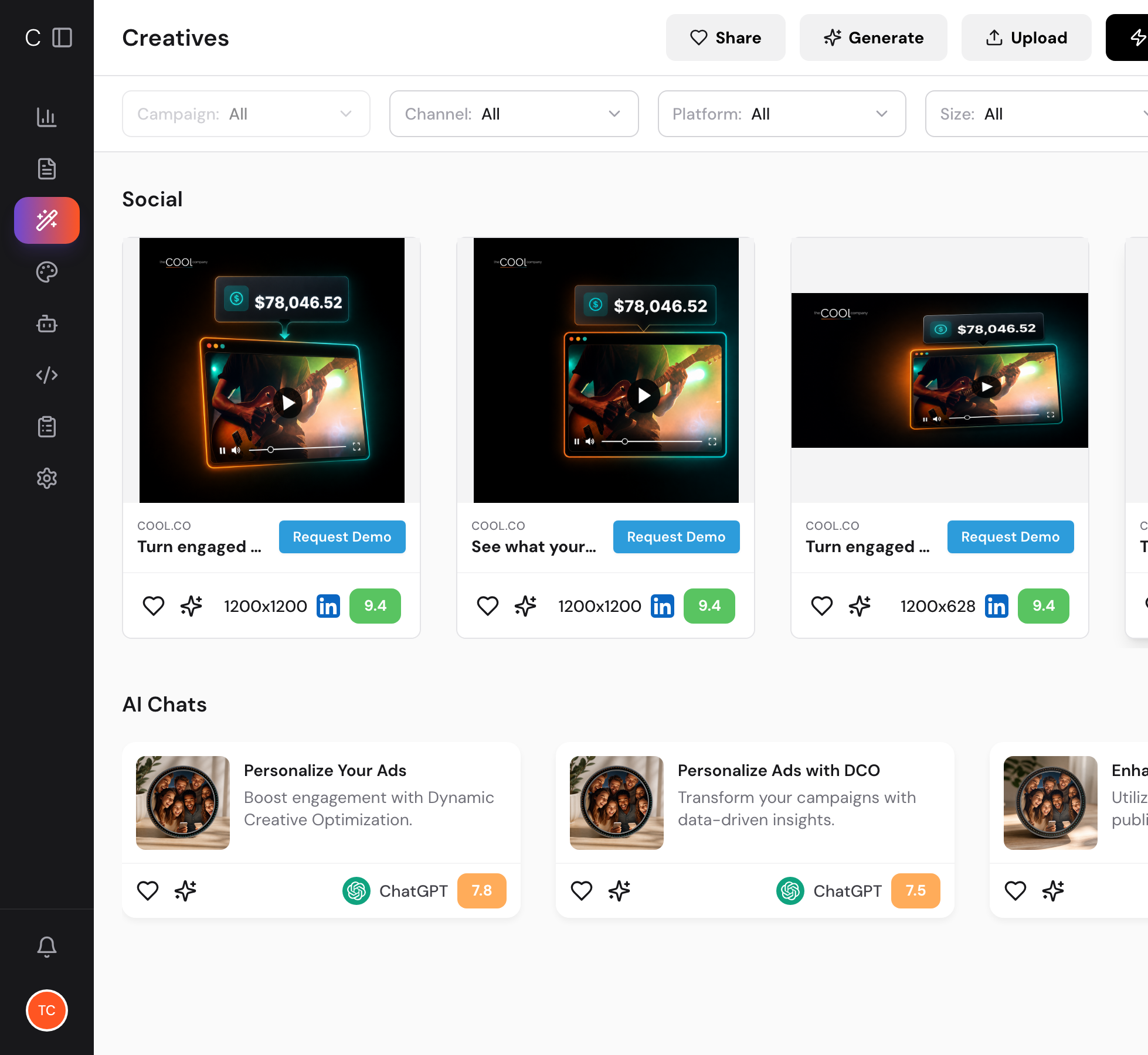
Each creative in the library shows its preview, format/size (e.g. 1200×1200), the
platform it's built for, and an AI quality score badge.
Finding your way around the library
- Top toolbar: Generate new creatives, Upload your own, Share a selection, or
Build Campaign to take creatives live. - Filters: narrow the grid by Campaign, Channel, Platform, Size, or
Format, then click Apply Filters. - Brand selector (top-right): the library shows creatives for the selected brand only. Switch
brands here if you don't see what you expect. - Sections: creatives are grouped by type, such as Social, Display, AI Chats, and
Uploaded Media for anything you added yourself.
What you can do
- Generate a creative set from a short brief (or let Chip guide you).
- Review and edit copy and visuals, and regenerate weak ones.
- Check quality scores to lead with your strongest ads.
- Share a public gallery link with clients for feedback, no login needed.
What's next
Updated about 2 months ago
Did this page help you?