

A tour of the dashboard
Find your way around COOLAI: the sidebar, the brand selector, and where each task lives.
COOLAI is organized around a left sidebar. This page maps each area so you know where to go for
every task.
Before you beginAccept your invitation and log in first. Most areas need a brand selected.
The layout
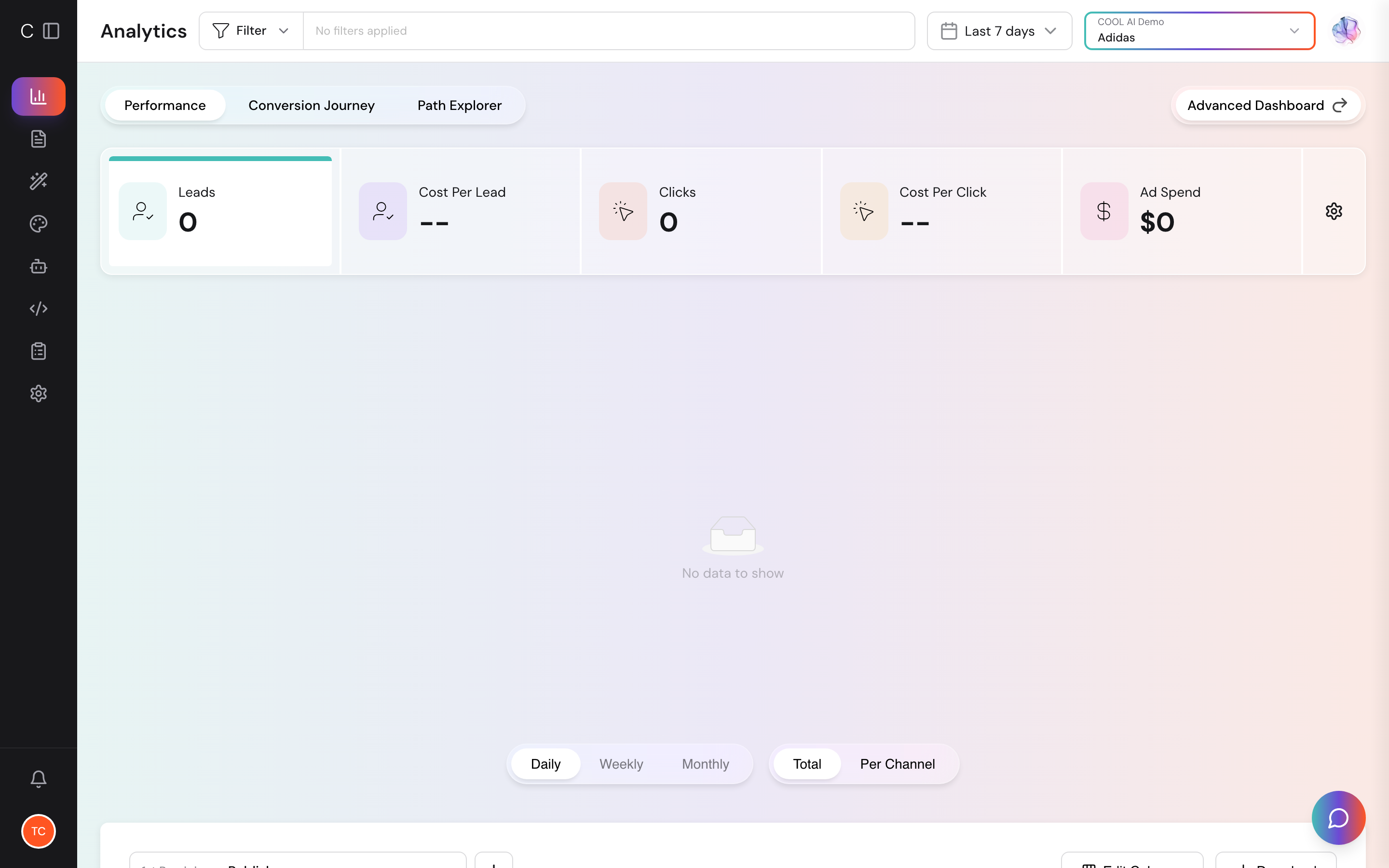
The sidebar
| Item | What it's for |
|---|---|
| Analytics | Performance dashboards, conversion journeys, and path explorer. |
| Campaigns | Create, launch, import, and manage campaigns. |
| Creatives | Browse, edit, score, and share generated creatives. |
| Brand Kits | Build and manage your brand assets and profile. |
| AI Assistant | Chat with Chip to set up campaigns and get insights. |
| Pixel Tracking | Install and verify your conversion pixel. |
| Reporting | Build and download performance reports. |
| Settings | Company, team members, brands, connected accounts, billing. |
Other elements
- Brand selector (top bar): switch between brands and companies you manage.
- Chip button (bottom-right): opens the AI assistant from any page.
- Notifications (top-right): job completions (e.g. creatives ready) and activity.
What's next
Updated about 2 months ago
Did this page help you?